5 Revenue Audit Procedures External Auditors Can Run With a Prebuilt Agent
.png?width=1400&quality=90&format=avif&crop=fit)
Revenue is one of the highest-risk areas on any audit. It is also one of the most document heavy. Testing cutoff, tracing receipts to open receivables, verifying deferred revenue schedules, these procedures involve doing a lot of matching across a large number of documents.
Here are five Prebuilt Agents for revenue and receivables that are worth adding to your next engagement. See an explainer video below before we get started:
1. Sales Cutoff Testing
What the Agent does
The Agent tests shipments around the period-end date against dispatch records and delivery evidence. Its job is to confirm that revenue is recognized in the correct period, not a day early, not a day late.
When to use it
Cutoff is one of the most common areas of revenue misstatement, intentional or otherwise. This Agent is most useful when testing a population of transactions close to period-end, where timing differences between dispatch, delivery, and invoice date can push revenue into the wrong period.
What to expect
The Agent first assesses the workpaper structure and the imported documents, extracts the relevant key dates and values from invoices, dispatch records, and delivery confirmations, and then compares those results against the population as part of the testing process. It produces a summary showing which items fall inside the period and which are exceptions for further review. It will flag anything where the evidence doesn't support the recognized date.
Tips
- Focus the population on the last two weeks and first two weeks around period-end, that is where cutoff risk concentrates.
- Make sure your dispatch and delivery documents are uploaded alongside the invoice population before running the Agent.
- Use the exceptions summary as your starting point for selecting follow-up samples, not as a definitive list of errors.
2. Deferred Revenue Recognition Recalculation
What the Agent does
The Agent recomputes deferred revenue released in the period. It checks whether the amounts recognized align with straight-line recognition over the contract term, verifying both the amount and timing.
When to use it
Any engagement with subscription contracts, SaaS arrangements, or multi-period service agreements will have deferred revenue on the balance sheet. Manually tracing each release back to the contract start date, end date, and total contract value takes significant time at scale. This Agent automates that recalculation.
What to expect
You supply the contract data and the deferred revenue schedule. The Agent first assesses the workpaper structure and the imported documents, then recalculates what should have been recognized in the period based on the contract term and total value, and compares that figure against what was recognized. Differences above a threshold are flagged for follow-up.
Tips
- Confirm that your contract data includes start dates, end dates, and total contract values, these three fields drive the recalculation.
- If contracts have variable consideration or milestone-based billing, note that the Agent uses straight-line recognition as its baseline. Exceptions may require a separate assessment.
- The Agent is an efficient first pass. Use its output to identify which contracts to inspect more closely, rather than treating every flagged item as a confirmed misstatement.
3. Cash Receipt-to-AR Matching
What the Agent does
The Agent matches cash receipts to open receivables and confirms that each receipt was applied to the correct customer account in the correct amount.
When to use it
This procedure tests existence and completeness of accounts receivable and confirms that the AR ledger accurately reflects outstanding balances. It is particularly useful when client volumes are high and manual matching would require sampling a fraction of the population.
What to expect
The Agent first assesses the workpaper structure and the imported documents, extracts the relevant key fields from the cash receipts file and the AR ledger, and then matches each receipt to an open item by customer, amount, and date. It produces a matched population and a set of exceptions, including unapplied receipts, partial applications, and receipts that do not tie to a ledger entry. You get a clear summary of matched and unmatched items.
Tips
- Agree on your matching tolerance before you run the Agent. Small rounding differences are common in high-volume AR environments and do not always indicate an error.
- Unapplied cash is worth reviewing separately, it can indicate either a timing difference or an unrecorded liability.
- If the client uses multiple AR sub-ledgers, run the Agent against each one individually and consolidate the exception outputs.
4. Revenue-to-SOW Substantiation
What the Agent does
The Agent traces recorded revenue back to the signed statement of work and supporting invoice. It confirms that the amounts recognized match what was agreed and documented before billing.
When to use it
For professional services firms, project-based businesses, and any engagement where revenue follows a statement of work, this procedure tests whether the amounts billed and recognized are supported by what the client agreed to. It is a key test for completeness and occurrence.
What to expect
You provide the revenue population, the corresponding invoices, and the signed SOWs. The Agent first assesses the workpaper structure and the imported documents, extracts the relevant key fields, amounts, dates, deliverables, and client references, and then compares those results across all three documents. It flags items where the invoice amount exceeds the SOW value, where referenced deliverables do not match, or where a signed SOW is missing entirely.
Tips
- Make sure SOWs are organized and named in a way the Agent can match to the corresponding invoice. A consistent file naming convention helps significantly.
- Missing SOWs are themselves a finding, the Agent will surface these as exceptions, and they warrant follow-up regardless of whether the amounts look reasonable.
- For large engagements with hundreds of SOWs, run the Agent on the full population first, then stratify the exceptions by value to prioritize your follow-up.
5. Manual Revenue Entry Review
What the Agent does
The Agent reviews manual and top-side revenue journal entries for valid business rationale and supporting evidence. It identifies entries that lack documentation or that fall outside normal posting patterns.
When to use it
Manual journal entries to revenue accounts are a significant fraud risk indicator, and a standard area of scrutiny under ISA 240 and AS 2401. This Agent is designed to test whether those entries are supported, authorized, and explainable.
What to expect
The Agent first assesses the workpaper structure and the imported journal entry population, typically a full-period extract from the general ledger, and then flags entries that are manual, that post to revenue accounts outside the normal transaction flow, or that lack attached support. It surfaces entries posted at unusual times (period-end, late at night, weekends) and those without documented rationale.
Tips
- Run this Agent on the complete journal entry population for the period, not a pre-filtered sample. Its value is in surfacing anomalies you would not have selected manually.
- Set your own criteria for what counts as "unusual" before reviewing the output, high-value thresholds, time-of-day filters, and user-based filters all help reduce noise.
- Entries flagged by the Agent still require auditor judgment. The Agent surfaces patterns; you determine whether they represent risk.
What comes next
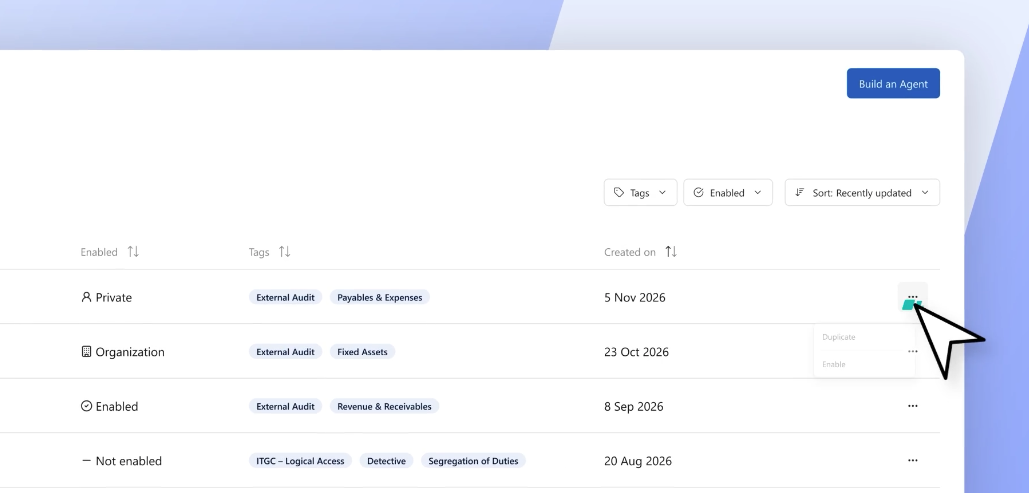
Each of these Agents is available in the DataSnipper Prebuilt Agents library. You can enable any of them with one click, run them as-is on your next engagement, or customize them in Agent Builder to match your firm's methodology.
.png?width=600&quality=70&format=auto&crop=16%3A9)