How AI Agents Execute Audit Workflows in Excel: 12 Real Procedures
.png?width=1400&quality=90&format=avif&crop=fit)
Key takeaways
- Most AI tools in audit produce an output and stop. The auditor still moves that output into the workpaper, connects it to source documents, and prepares it for review. AI agents change that by executing the full procedure, not just one step of it.
- Excel Agents run complete audit workflows inside Excel, from extracting data from source documents to producing a structured, review-ready result with linked evidence.
- The 12 workflows covered here span four core areas: reconciliation and matching, controls testing, end-to-end transaction testing, and pricing and calculation testing.
- Agent Builder lets firms capture any of these procedures as a reusable agent the whole team can run, making consistent, senior-level execution available across engagements without rebuilding the workflow each time.
- Results are backed by linked evidence and Excel formulas, so reviewers can verify the work without retracing the entire procedure.
That handoff is where most of the manual time in the audit workflow lives. Task-level AI reduces effort on individual steps. It does not remove the coordination work that sits between them.
How audit workflow automation differs from task-level AI
Audit work is procedural. Engagements run the same core sequences: trace a sample to its supporting document, reconcile two sets of figures, test whether controls operated as intended, verify that a calculated amount matches the underlying data.
Task-level AI improves individual steps. An auditor might prompt a tool to extract invoice amounts from a set of PDFs or flag discrepancies in a reconciliation table. The tool returns an answer. The auditor then takes that answer and builds the next step.
Workflow-level AI agents take the full procedure and execute it. They read the procedure, identify the required documents and data, extract what they need, apply the testing or matching logic, and write the output back to the workpaper. The steps connect. Each output feeds the next. The auditor reviews the result rather than assembling it.
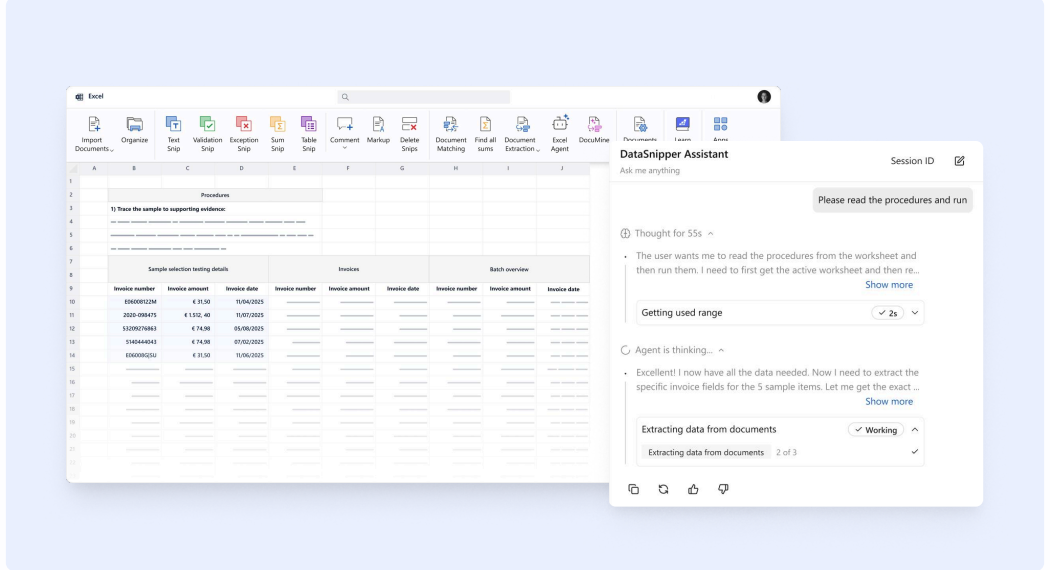
12 audit workflows Excel Agents run end to end
The workflows span four categories. Each represents a complete procedure: a defined input, a sequence of extraction and testing steps, and a structured output that is ready for review. The agent executes the full procedure using documents loaded into the same Excel workbook.
Reconciliation and Matching
Batch payment testing | Matches individual invoices to a batch payment overview, then reconciles the batch total to the bank statement. Flags invoices missing from the overview and any bank differences that cannot be explained. |
Cash/bank reconciliation | Agrees the general ledger ending balance to the bank statement, extracts and tests all reconciling items, and traces each to supporting documentation. Marks items as Pass or Exception. |
Trial balance to financial statement reconciliation | Creates a mapping table linking trial balance account codes to financial statement line items, compares aggregated balances against reported figures, and flags variances outside the rounding threshold. |

Controls Testing
AP approval matrix testing | Compares each sampled invoice amount against the relevant approver's authorization limit. Flags invoices where the amount exceeds the authority level or where the approver is not recognized in the matrix. Produces a findings table covering over-limit approvals, missing approvals, and unrecognized approvers. |
ITGC access control testing | Extracts the approved access level from each authorization record and compares it against the system listing. Identifies users whose access exceeds what was authorized, including terminated employees and those whose roles have changed. |

End-to-End Transaction Testing
Revenue testing | Matches sampled transactions to invoices, shipping documents, and bank receipts. Documents pass or fail status for each item in the evidence chain, and flags any gaps for potential cut-off errors or unsupported revenue. |
Payroll testing | Extracts authorized compensation details from employment contracts and HR records, recalculates expected net pay, and compares the result against the payroll register within a defined threshold. Refers exceptions to the client. |

Pricing and Calculation Testing
Inventory pricing testing | Extracts unit prices from supplier invoices, compares against unit costs in the inventory listing, and flags items outside the acceptable difference threshold for explanation or correction. |
Royalty calculations | Summarizes royalty-bearing sales by quarter from the sales detail worksheet, reconciles to the royalty statement, and recalculates expected royalty fees at the contracted rate. Quantifies exceptions and escalates. |

SOC Controls Analysis and Testing
SOC report exception analysis | Extracts all noted exceptions from a SOC 1 or SOC 2 report, maps each to the applicable control objective, assesses relevance to the user entity, and flags those requiring additional audit procedures or compensating control evaluation. |
Control objective mapping | Extracts controls from the SOC report or internal controls documentation, maps each to applicable audit assertions, notes whether the control is preventive or detective, and flags gaps where no effective control covers an assertion. |

Data Preparation and Structuring
Consolidating unstructured tables and documents | Combines data from multiple source files, including Excel workbooks, scanned tables, and PDFs, into a single standardized output. Applies a completeness check and flags records that cannot be reliably extracted for client clarification. |

What this looks like in practice: batch payment testing
Done manually, the procedure requires an auditor to pull key fields from each invoice, match it to the corresponding line in the overview, confirm the amounts, then verify the batch total against the bank statement entry. For batches with dozens of invoices, this takes hours. Exceptions require additional investigation before the workpaper can be signed off.
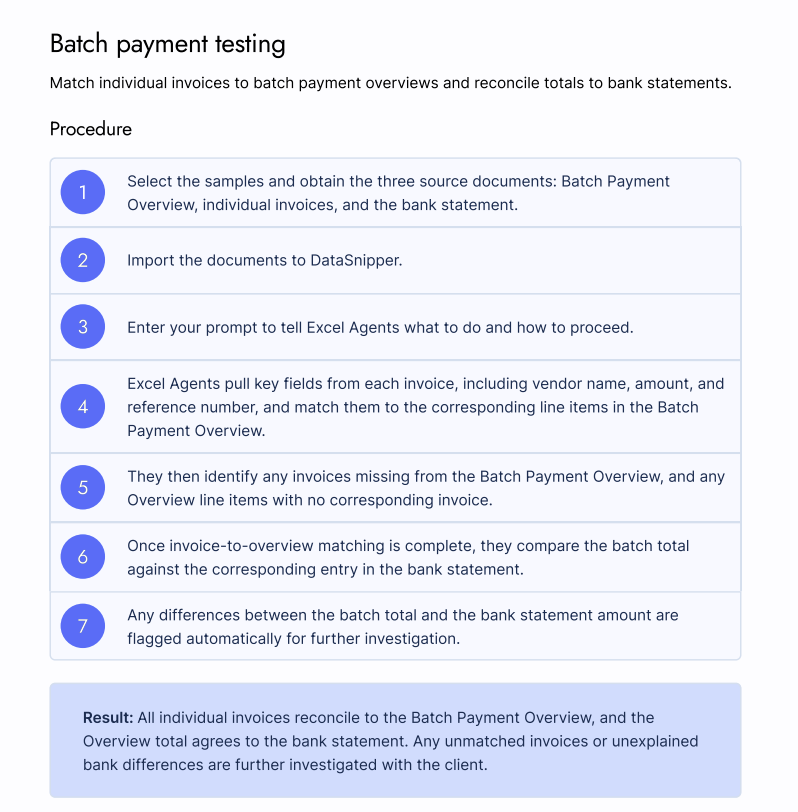
With Excel Agents, the auditor loads all three documents into DataSnipper within the same Excel workbook and enters a prompt. The agent reads the workpaper and executes the procedure:
- Key fields are extracted from each invoice: vendor name, amount, and reference number.
- Each invoice is matched to its corresponding line item in the batch payment overview.
- Invoices missing from the overview are identified, and overview line items with no corresponding invoice are flagged.
- Once invoice-to-overview matching is complete, the batch total is compared against the bank statement entry.
- Any differences between the batch total and the bank statement amount are flagged for further investigation.
The result: all invoices reconciled to the overview, the overview total agreed to the bank statement, and unmatched items or unexplained differences documented and escalated. The auditor reviews the output and investigates exceptions. The workpaper is review-ready by design.
"Excel Agents significantly reduce time spent on repetitive testing. While the agents prepare the audit documentation, our team can work on something else and then come back to review. For audits with hundreds of selections, that efficiency makes a real difference."
Nicholas T. Robbins, Director of Audit and Accounting, FGMK
How Agent Builder turns procedures into team standards
For firms that want the same procedure executed consistently across engagements, Agent Builder converts any workflow into a reusable agent the whole organization can access.
An auditor selects the relevant agent, loads the required documents, and runs it. The same logic, the same output format, and the same exception-handling behavior apply each time the procedure is run. Senior knowledge gets encoded once and stays accessible across the team. Consistency does not depend on who is running the engagement.
.png)
Frequently asked questions
What is audit automation?
Audit automation refers to software executing steps in an audit procedure without manual intervention. At the task level, this means automatically extracting data or flagging a variance. At the workflow level, it means running a complete procedure from input to review-ready output, including extraction, matching or testing, exception flagging, and documentation, without requiring the auditor to manage handoffs between steps.
How do AI agents work in an audit workflow?
AI agents read a defined procedure, identify the required data and documents, extract what they need, apply the testing or matching logic, and write the output back to the workpaper. Each step feeds the next. The auditor reviews the completed result and resolves any flagged exceptions rather than assembling the output from individual task results.
Can audit automation tools work inside Excel?
Excel Agents run directly inside Excel through the DataSnipper add-in. Auditors import supporting documents into the workbook, enter a prompt or select a pre-built agent, and the agent executes the procedure within the existing workpaper. Data does not need to move into a separate system, and the output is in the format the audit file already uses.
Do automated audit tools offer real-time insights?
Automated audit tools surface exceptions and discrepancies as they run through the procedure. In batch payment reconciliation, the agent flags unmatched invoices and bank differences during execution rather than after a separate manual review. Auditors see findings as part of the output rather than discovering them in a later review pass.
What are automated controls in audit?
Automated controls are control activities performed by a system rather than a person. In controls testing, auditors test whether those automated controls operated as designed during the period under review. For AP approval matrix testing, for example, an Excel Agent compares each sampled invoice against the authorization matrix and documents whether the approval was within the authorized limit, flagging over-limit or missing approvals for further review.
How does audit workflow automation reduce engagement turnaround time?
By running extraction, matching, and testing steps in sequence rather than in isolation, audit workflow automation removes the coordination time between steps. A procedure that would take a full day manually can run while the auditor focuses on other work. Across an engagement with multiple reconciliation and testing procedures running in parallel, that time savings compounds.

.svg?width=600&quality=70&format=auto&crop=16%3A9)